You already manage your products in BigCommerce. That makes it easier to add eBay, Amazon, or another marketplace.
Your product data is already in place. The real task is preparing it for each channel and keeping it accurate after your listings go live.
Selling on marketplaces also brings specific requirements. You need to handle:
- categories and item specifics;
- listing policies;
- inventory and price updates;
- orders and shipping data.
Instead of managing BigCommerce and a marketplace as two separate operations, tools like M2E Multichannel Connect help bring them together. Your existing product data can support eBay listings while your team keeps working from a familiar ecommerce setup.
How to Connect Your BigCommerce Store to eBay
Expanding to eBay or other online marketplaces doesn’t require a new product management system. BigCommerce can remain the main place where you manage:
- product data;
- pricing;
- inventory;
- images;
- catalog changes.
From your BigCommerce catalog, you can choose which products are ready for each marketplace and start with only the items or channels you want to test.
An integration solution such as M2E Multichannel Connect can then help adapt that existing product data to marketplace requirements.
Depending on the channel, it can help you:
- adapt store data to marketplace requirements;
- manage marketplace-specific product details;
- synchronize inventory and prices;
- keep supported listing updates connected;
- bring marketplace orders into BigCommerce.
This keeps the setup clear as your catalog and channel mix grow. BigCommerce remains your main product base, while eBay and other marketplaces operate as additional sales channels connected to your existing ecommerce workflow.

Start Selling on eBay Without Rebuilding Your Catalog
Rather than recreating products from scratch, you can use your existing BigCommerce catalog to prepare eBay listings and expand from there.
Connect your store and marketplace
First of all, you need to link your BigCommerce store to your eBay seller account.
You can use M2E Multichannel Connect to create this connection and make your existing BigCommerce products available for your eBay workflow. The full technical setup is covered in the M2E documentation, so you can focus on the more important question: what should you sell first?
Start with a focused product group
For your first eBay launch, choose a smaller set of products with:
- accurate stock;
- complete descriptions and attributes;
- strong product images;
- predictable fulfillment;
- existing demand.
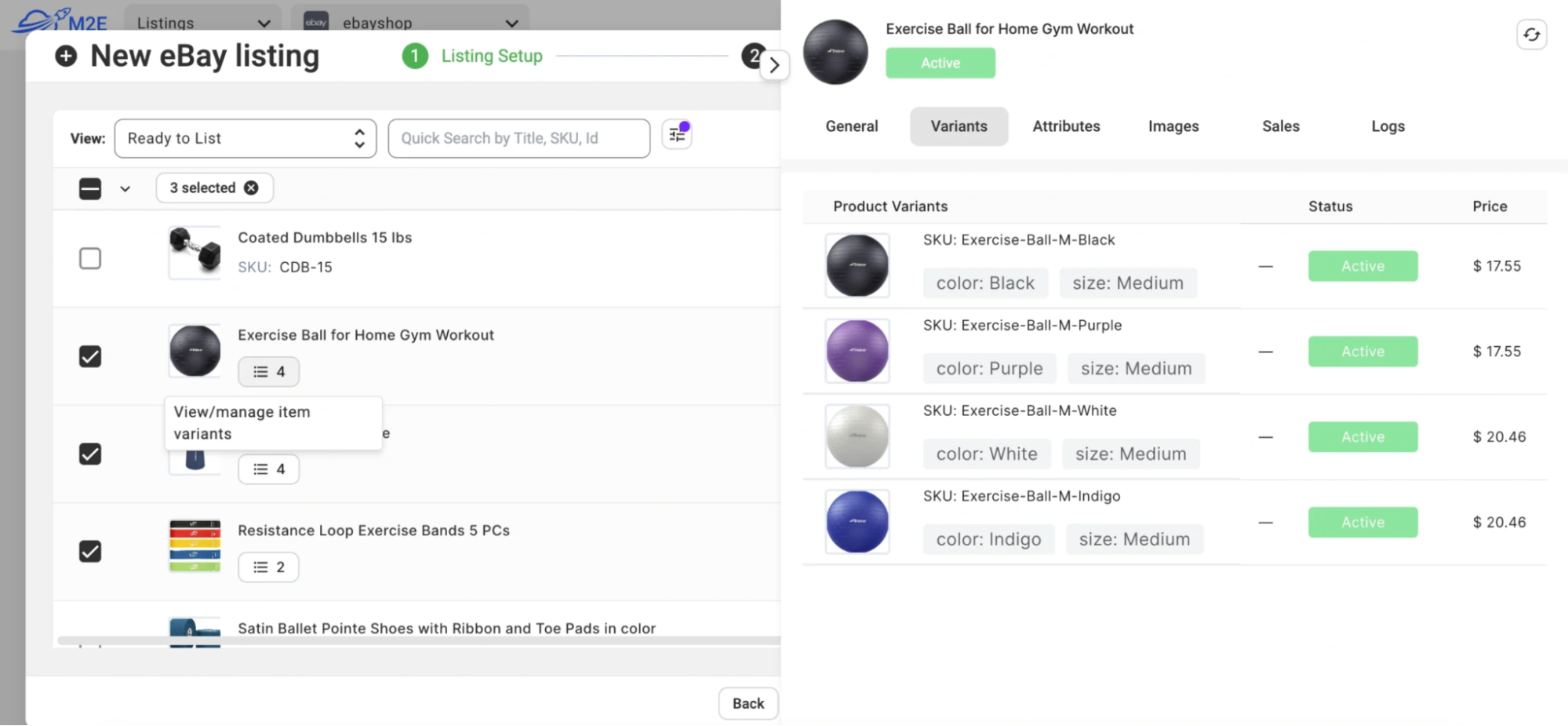
For catalogs with many SKUs, avoid publishing everything at once. Start with selected products so you can check listing quality, pricing, shipping, and product data first. When the workflow is ready, you can add more products using your existing BigCommerce catalog.
Prepare products for eBay
BigCommerce and eBay don’t organize product data in exactly the same way.
Before publishing, you still need to complete the marketplace details eBay expects, such as:
- category;
- item specifics;
- condition;
- other required attributes.
What Happens After Your eBay Listings Go Live?
Getting products onto eBay is one task. Keeping them accurate after launch is another.
As your catalog grows, manual updates can become harder to manage. Stock changes, price updates, and marketplace orders all need to stay aligned with what is happening in BigCommerce.
Manage inventory smartly
Inventory can change at any time.
A product may sell through BigCommerce while the same item is still available on eBay. If you manage channels separately, your team has to update marketplace quantities manually.
Inventory synchronization helps keep stock levels aligned between your store and eBay.
That can help reduce:
- repeated quantity updates;
- differences between store and marketplace stock;
- the risk of selling more units than you can fulfill.
Keep product updates moving
Prices and product details also change over time.
When you update a price in BigCommerce, a connected marketplace workflow can pass that change to the relevant eBay listing. The same can apply to other supported product updates.
This reduces the need to make the same change in multiple systems.
Process eBay orders through BigCommerce
You can also bring eBay orders into BigCommerce and process them alongside your store orders.
The process is simple:
eBay order → BigCommerce order → fulfillment → shipment and tracking update
This keeps order management in one familiar workflow
3 Tips on How to Keep Product Data Consistent
Product titles, images, and prices are only part of an eBay listing. You also need to make sure the rest of your catalog data matches eBay’s requirements.
This becomes more important as your catalog grows. Small inconsistencies that are easy to fix across ten products can become a major task across hundreds of listings.
1. Standardize product attributes
Start by reviewing the attributes used across your BigCommerce catalog.
Where possible, use consistent values for details such as:
- brand;
- size;
- color;
- material;
- product type.
Consistent source data makes it easier to match your store attributes to the fields eBay requires.
2. Reuse settings for similar products
Products within the same category usually share many marketplace requirements.
Instead of setting up each listing separately, use reusable category rules and common attribute structures for similar products.
This reduces repeated work and helps keep listings consistent across the catalog.
3. Build validation into your workflow
Before publishing new listings, check that all required marketplace data is complete.
Pay particular attention to:
- category selection;
- required item specifics;
- condition;
- attribute values.
A consistent validation process helps catch problems before they affect publication and makes larger catalog updates easier to manage.
Where Fera.ai Fits Into the BigCommerce Workflow
Marketplace growth is only one part of a strong ecommerce strategy. Your BigCommerce store also needs to build trust with shoppers who buy directly from you.
Fera.ai can help with that side of the business.
The app works with your BigCommerce storefront and lets you add social proof such as:
- customer reviews;
- product ratings;
- review widgets;
- other trust-building content.
This gives Fera.ai a different role from M2E.
M2E supports the operational side of multichannel selling, including your BigCommerce and eBay workflows. Fera.ai focuses on the shopping experience inside your own store.
For growing sellers, this creates a useful combination. You can use M2E to expand beyond BigCommerce and manage marketplace operations, while Fera.ai helps make your direct sales channel more convincing for new and returning shoppers.
Conclusion
Expanding to eBay or another marketplace doesn’t require a separate product catalog. You can continue managing products in BigCommerce and use that existing information for your marketplace listings.
M2E Multichannel Connect keeps the two channels connected, so you can manage changes to stock, prices, listings, and orders from one workflow.
You also don’t need to move your whole catalog at once. Start with a few products, test the setup, and expand to other marketplaces once you know the workflow works well for your business.